
 LookPlan
AI Face Analysis for Makeup That Suits You
Understand your features. See a personalized makeup and styling look on your own photo, then get practical steps to help you recreate it.
Free face analysis. Makeup previews and full reports use credits.
AI Face Analysis ReportMaya · Business Casual Polish
SamplePart 1 of 3 · Contrast
Your photo and the improved look
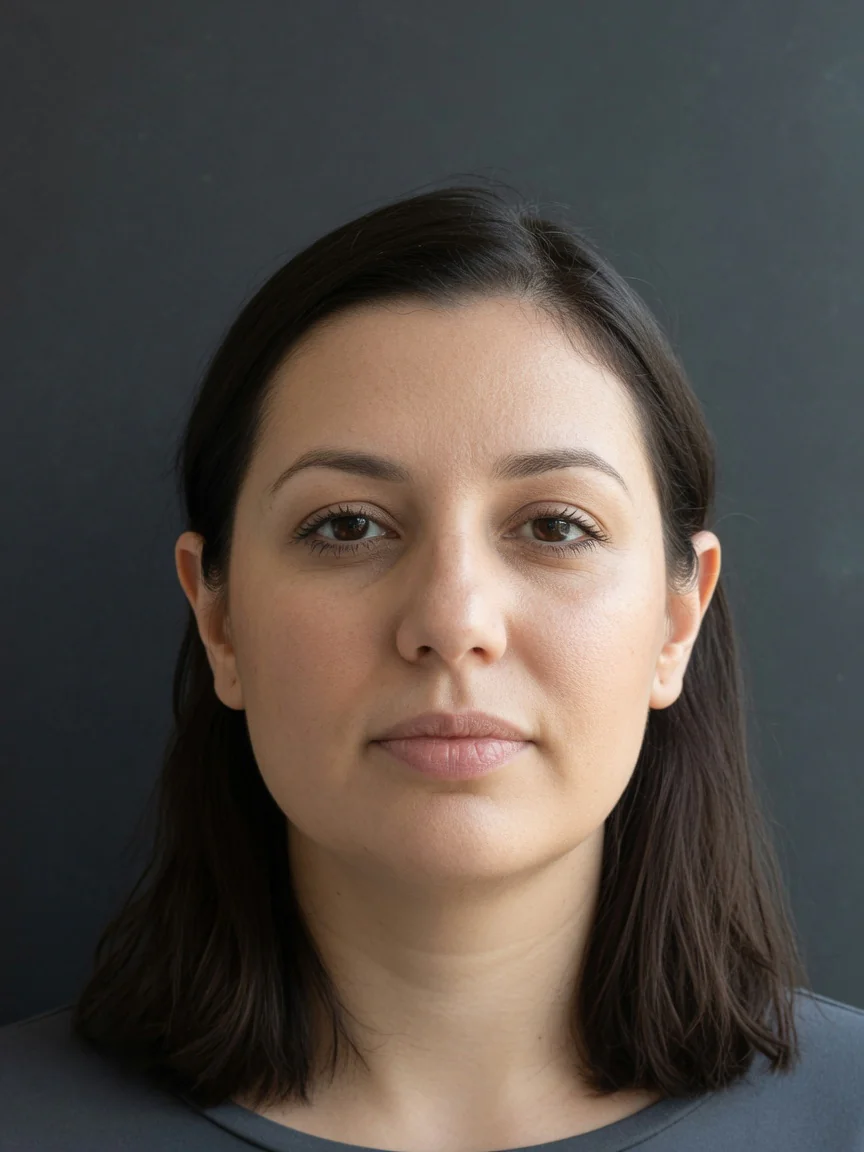 Loading image…
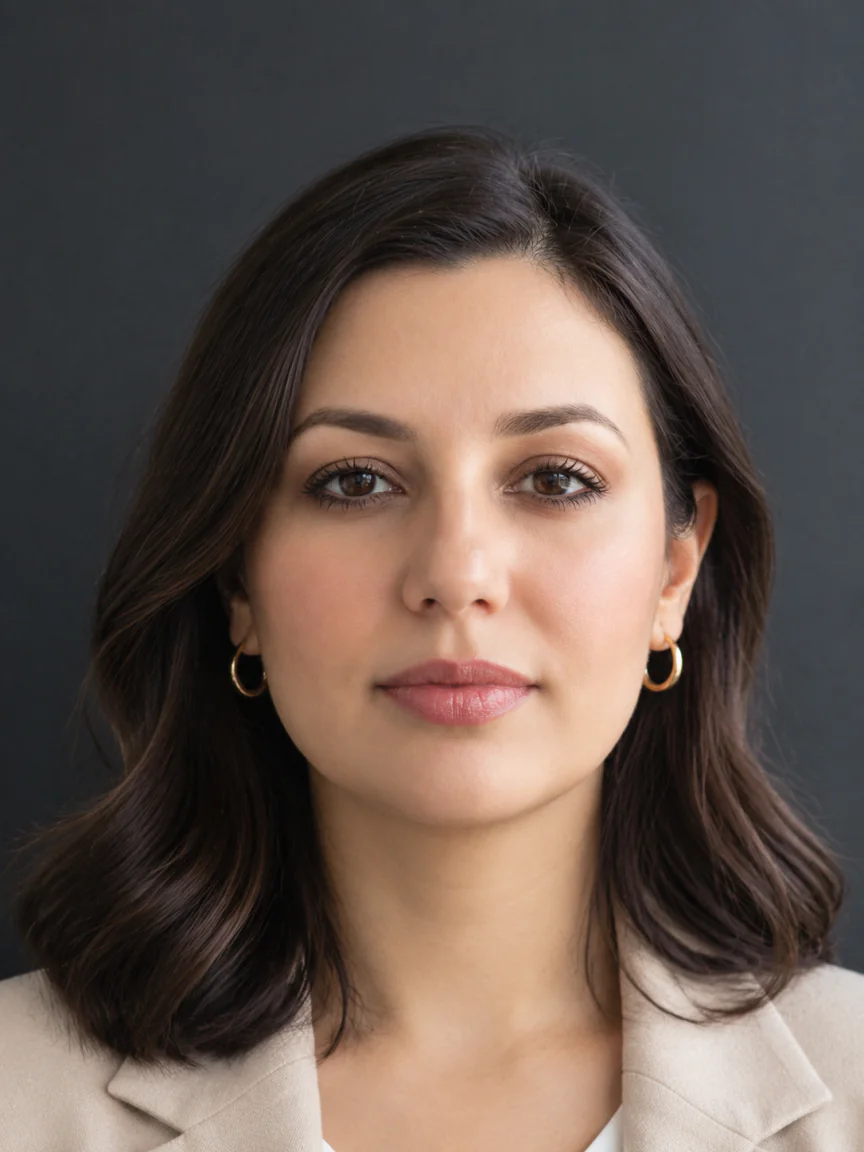 Loading image…
Applied
See what changed in this look, then explore the steps you can try.
- Hair stylingAdded volume at the roots and styled into soft, polished waves framing the face.
- Eye makeupApplied warm-toned eyeshadow and defined the upper and lower lashes with mascara.
- Lip makeupApplied a satin, rosy-pink lip color with soft sheen to define the lip shape.
- Skin finishBrightened the under-eye area and evened the complexion with a radiant finish.
- AccessoriesAdded classic small gold hoop earrings.
- WardrobeReplaced the casual grey t-shirt with a structured beige blazer and white top.
Contrast
AI Face Analysis ReportMaya · Business Casual Polish
SamplePart 2 of 3 · Now
What the analysis found
In 30 seconds
The styled look projects a polished, professional elegance. It enhances the natural warmth of the features through soft volume and tailored styling.
What holds the face
- Natural symmetry
- Smooth warm skin tone
- Beautifully shaped, expressive dark eyes
Next: practical styling suggestions
Report observations
AI Face Analysis ReportMaya · Business Casual Polish
SamplePart 3 of 3 · Next
What to do next
Structure & proportion
Must do
- Apply a root-volumizing spray to the crown before blow-drying to add vertical height.
- Style hair with outward-curving waves that begin at eye level to balance the facial outline.
Avoid
- Slicking hair flat to the sides of the head.
- Heavy horizontal cuts that visually compress facial length.
Features & balance
Must do
- Define the upper lash line with a soft brown pencil to accentuate the eyes.
- Use a rosy lip liner to lightly define the borders of the lips.
Avoid
- Extremely harsh, thick eyeliner that can overpower the eyes.
- Overly pale nude lip colors that wash out the lower face.
Skin & contrast
Must do
- Apply a peach-toned color corrector or hydrating concealer under the eyes.
- Select clothing in warm neutral shades like cream, beige, or camel.
Avoid
- Flat, cool greys close to the face.
- Matte, heavy foundation that masks the skin's natural radiance.
Hair & framing
Must do
- Let face-framing layers fall forward instead of tucking hair behind both ears.
- Create soft, loose bends with a medium-barrel curling iron.
Avoid
- Perfectly straight, flat hair styles that cling to the head.
- Tight, rigid ringlets that lack movement.
Overall styling
Must do
- Incorporate tailored jackets or blazers with structured lapels to frame the neck.
- Wear classic gold hoop earrings to add warmth and light near the face.
Avoid
- Shapeless, high-neck t-shirts in washed-out tones.
- Overly large, distracting accessories that compete with facial features.
Sample AI Face Analysis Report
Sample report created with an AI test photo.
From AI Face Analysis to Your Next Look
01 Choose a clear, front-facing photo
Start with one photo. Your free face scan runs on your device.
More
Use even lighting, keep your hair away from your face, and look straight at the camera. Keep your whole face in view when you crop the photo to 3:4.
02 Understand your facial features
Explore your facial proportions, feature spacing, and symmetry, with a face-shape reference when available.
More
Explore your facial outline, jaw and chin, and the relationships between your features. These measurements describe this photo; they do not rate your attractiveness.
03 See your look and how to try it
Preview a personalized makeup look on your photo. Choose a Full report for practical steps to try it yourself.
More
Makeup previews and Full reports use credits. Trial includes images only in the Corporate Executive style; Full adds explanations and practical steps for your selected style. View your Full report online or save it as a JPG.
AI Face Analysis Examples
Explore facial insights, styling previews, and practical suggestions in our sample face analysis reports.
Samples created with AI test photos.
Explore personalized makeupView sample reports
Pricing
Face analysis is free. Use 4 credits for a Trial preview, or 10 credits for a Full report with facial insights, a personalized look, and practical steps.
Single report
1 AI Makeup report · 10 credits
$7.99 one-time
What you get
- Full AI Makeup report
In a full report
- What to do and what to skip
- An AI-generated makeup and styling preview
- View online or save as a JPG
- Pay once
Plus
30 full reports (300 credits each month)
$5.99 / mo
or $4.99/mo billed annually
What you get
- AI Makeup preview
- Full AI Makeup report
In a full report
- What to do and what to skip
- An AI-generated makeup and styling preview
- View online or save as a JPG
- Cancel anytime
- You can also use your credits for makeup previews.
Pro
100 full reports (1,000 credits each month)
$11.99 / mo
or $9.99/mo billed annually
What you get
- AI Makeup preview
- Full AI Makeup report
In a full report
- What to do and what to skip
- An AI-generated makeup and styling preview
- View online or save as a JPG
- Show results to clients
- Cancel anytime
- You can also use your credits for makeup previews.
FAQ
What photo should I use?
Use one clear, front-facing photo with your hair off your face and even lighting. We crop it to 3:4.
What does the free scan include?
It shows measurements of your facial proportions, jaw and chin, feature spacing, and symmetry. You can also view an estimated face-shape reference when available. The scan runs on your device, where your results remain available for about 24 hours.
How should I interpret my measurements and face shape?
Use them as a reference for the photo you provided. Pose, lighting, and visible features can affect the results. Face shape is an estimate, and some results may be unavailable.
Will I get a beauty score?
No. Your free analysis shows facial measurements without rating your attractiveness.
What can I get for free, and what is paid?
The scan is free. A Trial preview costs 4 credits and shows a Corporate Executive look, with images only. A Full report costs 10 credits and includes your selected style, a generated image, explanations, and practical advice.
What is included in a full report?
See your original photo alongside an AI-generated look. The report explains the changes and gives practical suggestions to try. View it online or save it as a JPG. Treat the generated image as a visual reference; real makeup results may differ.
How many reports do I get with each plan?
Single includes one Full report. Plus provides 300 credits each month, enough for 30 Full reports, and Pro provides 1,000 credits each month, enough for 100. Credits spent on previews come from the same balance.
Is my photo private?
The free scan processes your photo on your device. If you choose a makeup preview or Full report, your photo is uploaded and processed to generate the result. Your photo and generated result are not published to a public gallery. Read our Privacy Policy for more details.
Face Analysis
Understanding Your Facial Measurements
Facial proportions describe how parts of your face relate to one another in a photo. Comparing height and width, eye spacing, and the widths of the mouth and nose gives you more detail than a face-shape label alone.
Lookplan’s free scan uses on-device facial landmark detection to measure these relationships. Read the measurements together: a single ratio or left-and-right difference is not a beauty score or a target you need to meet.
Your photo affects what can be measured. Use a clear, front-facing image and treat the results as a starting point for understanding your features. You can explore makeup and styling ideas afterward, without treating your measurements as rules for how you should look.
Compare hairstyle ideas on your own photo with our AI Hairstyle Simulator.
Inside Your Face Analysis
Guides
On this site
Know How to Recreate Your Look
AI face analysis helps you understand your features. Your full report shows a personalized makeup and styling look on your photo and explains what changed.
Get practical suggestions for makeup, hair styling, and accessories that complement your features. Use the report to guide what you try next.
You don’t have to recreate every detail at once. Start with the suggestions that fit your routine, and use your preview as a visual reference.